
Smartphone Photography Tips: Get DSLR-Level Shots with Your Phone
Gone are the days when you needed an expensive DSLR to take professional-looking photos. Today’s smartphones pack powerful cameras with multiple lenses, AI enhancements, and pro modes that put incredible tools right in your pocket. But owning a great camera phone isn’t enough — it’s how you use it that makes the difference.

Here are smartphone photography tips to help you get DSLR-level results with just your phone:
1. Master the Light
Lighting is everything in photography. Natural light often beats artificial light.
✅ Shoot during the “golden hour” (just after sunrise or before sunset) for warm, soft tones.
✅ Avoid harsh midday light; if unavoidable, look for shade.
✅ At night, use available sources (street lamps, shop signs) instead of your phone’s flash.


2. Tap to Focus, Slide to Adjust
Most people just point and shoot — but your phone allows control.
Tap on your subject to set focus.
Slide up/down on the screen to adjust exposure (brightness).
Lock focus (long press on iPhone, AF/AE lock on Android) for moving subjects.
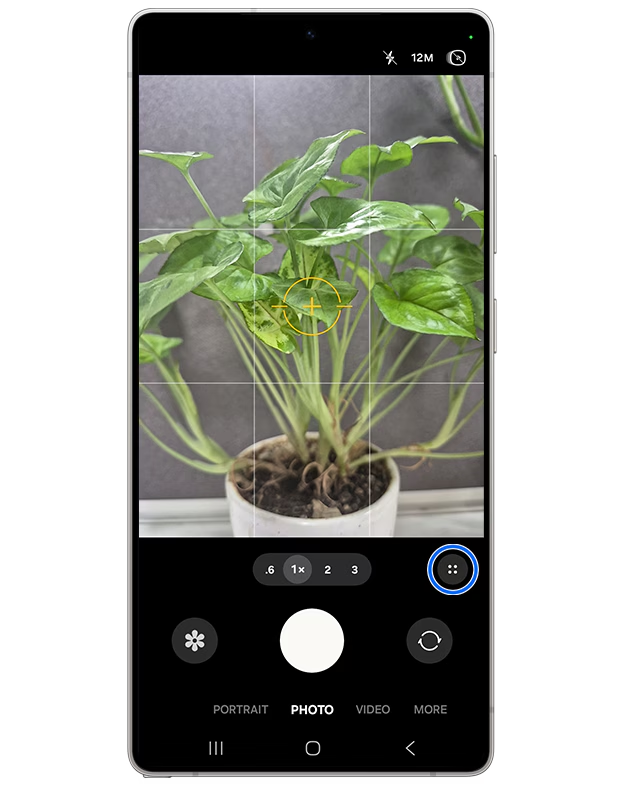
3. Use Gridlines for Composition
Turn on the grid feature in your camera settings. This helps apply the Rule of Thirds — placing your subject off-centre to create balance and interest.
Horizons should be straight.
Symmetry works great for architecture and landscapes.


4. Explore Pro/Manual Mode
Your phone might have a “Pro” mode — use it like a DSLR:
ISO → controls light sensitivity. Lower for daylight, higher for low-light.
Shutter speed → slower for motion blur, faster for action shots.
White balance → adjust warmth/coolness to match the environment.


5. Use Different Lenses Wisely
Modern smartphones come with wide, ultra-wide, and telephoto lenses.
Wide: Everyday portraits and general use.
Ultra-wide: Landscapes, group shots, dramatic angles.
Telephoto: Zoom without losing detail.
Tip: Learn your camera's maximum optical zoom. Post that, avoid digital zoom — it reduces quality. Step closer instead.


6. Use black and white filters
Black and white photos always have a different mood. they allow the focus to come directly on the subject.They take the focus to the shapes, rather than distracting colours.

7. Edit Like a Pro
Even professionals edit their photos. Use apps like Lightroom, Snapseed, or VSCO to:
Adjust brightness, contrast, and sharpness.
Add subtle colour grading for mood.
Crop and straighten to refine composition.

7. Don’t Overdo It
The best photos look natural. Avoid cranking up filters, oversaturating colours, or sharpening too much. Subtle editing always looks more professional.

The Bottom Line
Smartphone cameras today are more powerful than ever — but it’s the technique that transforms a good photo into a great one. By learning to use light, composition, manual controls, and editing tools, you can capture shots that rival DSLR quality.
✨ At LINEtech, we don’t just help you choose the perfect device — we help you get the most out of it. With the right phone and the right skills, your pocket-sized camera can produce professional magic.


Comments